
Instructions
Preloader Setup
The preloader gives you a visual experience while opening the page.
To edit the pre-loader and aligning with your brand are simply follow the instructions:
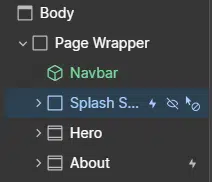
1. At homepage, you can see a splash screen block.
This block contained of text and animated block elements that you can customize.
This block contained of text and animated block elements that you can customize.
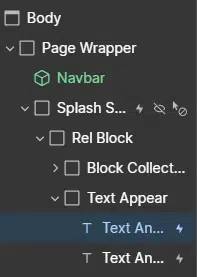
2. Open the block, you can see "text appear" class and its text element inside to be customize as you want.
Lennis Smooth Scrolling
We use Lenis smooth scrolling in this template.
If you want to customize the scrolling or even removes it, you can follow this instruction:
Go to page settings > custom code > footer code section
<script src="https://unpkg.com/lenis@1.3.4/dist/lenis.min.js"></script>

<script>
  const lenis = new Lenis({
    smooth: true,
    lerp: 0.07,
    wheelMultiplier: 1,
    infinite: false
  });

  lenis.on('scroll', ScrollTrigger.update);

  gsap.ticker.add((time) => {
    lenis.raf(time * 1000);
  });

  gsap.ticker.lagSmoothing(0);
</script>
Kindly removes the code it if you don't want use smooth scrolling.
Yet, if you just want to customize, change the lerp value. Lower value, more heavier.